|

|
 |
|
 |
|
| |
| Powerful Video Surveillance Software
WiLife Command Center software is included with every starter package software. This software is easy to use, yet high-powered. Command Center is a Windows application for watching live action, searching the recorded video archive, and setting options. Everything is just a click away.
- Manage and control up to six cameras
- Save disk space with smart video management
- Create email and cell phone alerts
- Link to your remote viewing account
- Access online software and camera updates
- Run Command Center in the background with little CPU usage
|
| |
 |
|
| |
| Command Center delivers features even the professionals don't have |
| |
 |
|
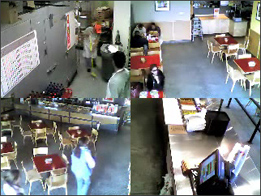
Live View
In Live view, you can watch the front door, driveway, kitchen, backyard, entertainment room, and office all at once.
Watch everything around your home or business as it happens. |
| |
|
|
 |
|
Playback View
In playback view you can access and play video clips from your video archive. Pick any day from a calendar to view a timeline of motion events for that day.
The playback controls allow you to play, pause, step forward & back, and adjust playback speed between super slow and very fast. Playback shows video from all cameras in parallel. |
|
|
|
 |
Destin Locksmithing:
13346 Hwy 98 West
Destin, FL 32550
tel: 850-654-9910
tel: 850-654-LOCK
fax: 850-654-9991
Email us
Panama City Beach Locksmithing:
264 South Hwy 79
Panama City Beach, FL 32413
tel: 850-249-9009
tel: 850-769-OPEN
fax: 850-249-9039
|
Other Service Areas:
Panama City, FL
850-234-5219
Santa Rosa Beach, FL
850-267-5603
Seagrove Beach, FL
850-231-1337
Niceville, FL
850-678-3400
Freeport, FL
850-835-0029
Ft. Walton Beach, FL
850-217-0884 |
|
|
|
|
| |
|
|
| |
| See what you have been missing!TM
Using the WiLife Command Center Software and your WiLife Online account, you can monitor live video from your cameras from anywhere in the world, at no additional cost, using a Windows® Media enabled Internet browser or Cell phone.
You can remotely monitor multiple-sites from a single account. Monitor each site in any of the following modes:
- Single camera view to watch one area
- Cycle view to rotate through all cameras
- Multiple view to see all cameras at once
Use Free Remote Viewing
When you enable free Remote Viewing, your WiLife Command Center Software becomes a video server, ready to publish video through the secure WiLife network over the Internet to you, wherever you are. WiLife intelligently creates the most efficient path through your local routers to your remote device. You connect to your video feed by going to https://online.wilife.com and logging into your account – using your email address and password. Once connected to your account, you select the site and cameras you want to monitor. The WiLife server then routes a live video feed to your device.
|
|
 |
| |
|
| |
|
|
|
 |